<p><strong>Ever wonder what really happens when you tap play on a movie, open YouTube, or join a video call?</strong> It feels instant. You click, and the internet responds. But behind that simple moment is a long chain of systems working together in seconds.</p>
<p>If you have ever asked, <strong>“<a href="https://www.velatia.com/en/blog/do-you-know-how-internet-reaches-your-home/">how does internet get to your house</a>?”</strong>, you are asking a smart question. The answer is not just “through Wi-Fi” or “through a wire.” The internet reaches your home through a step-by-step process that starts far away, often in another country, and ends at the phone, TV, laptop, or security camera in your house.</p>
<p>In 2026, more than <strong>5.3 billion people</strong> use the internet worldwide. In cities like Lahore, home internet has become a basic need for work, study, entertainment, shopping, and smart home devices. At the same time, many people still do not fully understand how internet reaches your home, why one connection is faster than another, or why the speed in one room feels great while another room feels dead.</p>
<p>This guide breaks it all down in simple language.</p>
<p>You will learn how data travels through the <strong>global backbone</strong>, how your <strong>internet service provider</strong> brings that connection into your area, how the line enters your home, what your <strong>modem</strong> and <strong>router</strong> really do, and how Wi-Fi finally reaches your devices.</p>
<p>By the end, you will not just know <strong>how internet gets to your house</strong>. You will also understand how to choose the right connection, spot weak points, and improve your setup without wasting money.</p>
<h2 id="the-global-internet-backbone-where-it-all-begins">The Global Internet Backbone: Where It All Begins</h2>
<p><img class="aligncenter wp-image-6942 size-full" src="https://comeawayhome.co.uk/wp-content/uploads/2026/05/768c66eb-030a-43bd-bea0-014e964810f1b-ezgif.com-jpg-to-webp-converter.webp" alt="how does internet get to your house" width="700" height="700" /></p>
<h3 id="how-data-travels-from-servers-to-your-country">How Data Travels from Servers to Your Country</h3>
<p>The internet is not one single thing. It is a massive network of networks connected across the world.</p>
<p>When you open a website or stream a video, the data usually starts in a <strong>server</strong>. A server is simply a powerful computer that stores websites, apps, videos, files, or online services. That server might be in Pakistan, Dubai, Europe, Singapore, or the United States.</p>
<p>So how does that data get here?</p>
<p>Most of the world’s internet traffic travels through <strong>undersea fiber optic cables</strong>. These are long cables placed on the ocean floor. They carry data as <strong>light signals</strong>, and they move huge amounts of information very quickly. In fact, around <strong>99% of international internet traffic</strong> depends on these cables, not satellites.</p>
<p>Pakistan connects to the wider world through these international systems. A good example is the <strong>AAE-1 cable</strong>, which links Asia, the Middle East, and Europe and has a landing point in Karachi. That means a request from a home in Lahore may travel through Pakistan’s national network to Karachi, then out to international cable systems, then to a foreign server, and back again in seconds.</p>
<p>That sounds like a long trip, but the process is extremely fast.</p>
<p>To make this work, data does not travel as one giant block. It gets broken into tiny pieces called <strong>packets</strong>. Each packet contains part of the information along with destination details. Network equipment reads those details and forwards the packets along the best possible path.</p>
<p>You can think of it like sending many small courier parcels instead of one huge box. Each parcel can move efficiently through the system, and the receiving device puts everything back together.</p>
<p>Satellites also play a role, but mostly in places where wired infrastructure is difficult or expensive. Services like <strong>Starlink</strong> use low-Earth orbit satellites to provide internet in remote areas. That can be useful in rural Pakistan or places with weak cable and fiber coverage. Still, in cities, fiber and cable usually offer better stability and lower delay.</p>
<h3 id="pakistan-s-internet-infrastructure-overview">Pakistan’s Internet Infrastructure Overview</h3>
<p>Once international data reaches Pakistan, it does not go directly to your home. It first moves through national infrastructure.</p>
<p>Pakistan relies on a mix of:</p>
<ul>
<li><strong>International gateways</strong></li>
<li><strong>Internet exchange points (IXPs)</strong></li>
<li><strong>National fiber routes</strong></li>
<li><strong>Internet service providers</strong></li>
<li><strong>Local distribution systems</strong></li>
</ul>
<p>Internet exchange points help networks share traffic more efficiently inside the country. Instead of sending local traffic far away and back, IXPs allow Pakistani networks to exchange data more directly. This improves speed and reduces unnecessary load.</p>
<p>Large cities like <strong>Karachi and Lahore</strong> play an important role because they are major telecom and traffic centers. Lahore, in particular, has grown into a key urban market for home fiber, business internet, and mobile broadband.</p>
<p>Government bodies and regulators also shape the system. The <strong>Pakistan Telecommunication Authority (PTA)</strong> oversees telecom regulation, while national backbone and access infrastructure depend on both public and private sector investment.</p>
<p>Here is a simple example.</p>
<p>Imagine you are in Lahore watching a YouTube video hosted on a server outside Pakistan. Your request leaves your home, goes to your ISP, moves through Pakistan’s backbone, reaches an international gateway, crosses international links, reaches the content server, and then returns through the same wider system. If the video platform has caching or local delivery systems closer to Pakistan, the process becomes even faster.</p>
<p>So before the internet reaches your home, it has already traveled through a huge digital highway system.</p>
<h2 id="step-1-your-isp-delivers-internet-to-the-neighborhood">Your ISP Delivers Internet to the Neighborhood</h2>
<h3 id="what-isps-do-in-the-process">What ISPs Do in the Process</h3>
<p>Your <strong>ISP</strong>, or <strong>internet service provider</strong>, is the company that connects your home to the internet.</p>
<p>In Lahore and other Pakistani cities, this may include providers such as <strong>PTCL</strong>, <strong>Nayatel</strong>, <strong>StormFiber</strong>, Transworld, or wireless operators offering fixed internet services.</p>
<p>An ISP does much more than send you a monthly bill.</p>
<p>It buys or manages bandwidth, runs network equipment, maintains fiber routes, installs neighborhood infrastructure, handles customer accounts, assigns IP addresses, and supports homes and businesses. In simple words, your ISP acts like the bridge between the global internet and your <a href="https://comeawayhome.co.uk/can-an-llc-buy-a-house/">house</a>.</p>
<p>When you subscribe to a package, you are paying for access to your ISP’s network. That network already connects upstream to larger national and global internet systems.</p>
<p>But the most important part for your daily experience is the <strong>last-mile network</strong>. This is the final part of the connection that brings the internet from the provider’s local system into your area and then into your home.</p>
<h3 id="common-delivery-methods-to-your-area">Common Delivery Methods to Your Area</h3>
<p>Different providers use different technologies to reach neighborhoods. Some use fiber optic lines. Others use cable, old telephone lines, or wireless towers.</p>
<p>Here is a simple comparison:</p>
<table>
<thead>
<tr>
<th>Connection Type</th>
<th>Speed Potential</th>
<th>How It Reaches Neighborhood</th>
<th>Availability in Lahore</th>
</tr>
</thead>
<tbody>
<tr>
<td>Fiber Optic</td>
<td>Up to 10 Gbps</td>
<td>Buried fiber cables or overhead optical lines</td>
<td>High in many urban areas</td>
</tr>
<tr>
<td>Cable</td>
<td>Up to 1 Gbps</td>
<td>Coaxial lines from street cabinets or boxes</td>
<td>Widespread in many zones</td>
</tr>
<tr>
<td>DSL</td>
<td>Up to 100 Mbps</td>
<td>Existing telephone copper lines</td>
<td>Common in older areas</td>
</tr>
<tr>
<td>5G Fixed Wireless</td>
<td>Up to 500 Mbps</td>
<td>Mobile towers and wireless receivers</td>
<td>Growing in urban pockets</td>
</tr>
</tbody>
</table>
<p>Fiber is the most modern and future-ready option. It carries data using light, which allows high speed and strong reliability. In many parts of Lahore, especially newer housing developments and premium residential areas, fiber rollout has expanded quickly.</p>
<p>Cable internet uses <strong>coaxial cable</strong>, the same basic type once used mainly for TV signals. It can still deliver strong speeds, especially where providers have upgraded their networks.</p>
<p>DSL uses traditional copper telephone lines. It helped millions of homes get online for years, but it has limits. The farther your home is from the provider’s equipment, the weaker the speed often becomes.</p>
<p>Fixed wireless uses a nearby tower instead of a direct cable line to your home. This can be helpful where laying fiber is difficult, but performance depends on coverage, weather, congestion, and signal quality.</p>
<h3 id="neighborhood-nodes-and-street-cabinets">Neighborhood Nodes and Street Cabinets</h3>
<p>Before the internet gets to your house, it usually reaches a <strong>local hub</strong> in your area.</p>
<p>This hub may be a:</p>
<ul>
<li>Fiber distribution box</li>
<li>Street cabinet</li>
<li>Pole-mounted splitter</li>
<li>Neighborhood node</li>
<li>Small provider hut or enclosure</li>
</ul>
<p>You can think of it as a mini distribution center. The ISP sends internet into that point, and from there the connection branches out to nearby homes.</p>
<p>In a fiber network, one main line may enter a local cabinet and then split into lines serving different streets or buildings. In a cable network, a node may feed multiple homes through coaxial branches. In DSL, the telephone network carries the signal through the copper system already installed in the area.</p>
<p>This is why your neighborhood matters. Two houses in the same city can get very different service if one sits in a fiber-covered block and the other still depends on old copper lines.</p>
<h3 id="fiber-vs-dsl-in-real-world-lahore-use">Fiber vs. DSL in Real-World Lahore Use</h3>
<p>Let’s make this practical.</p>
<p>If you live in a newer part of DHA Lahore, Bahria Town, or another developed urban zone, you may have access to <strong>fiber-to-the-home</strong> service. That usually means faster downloads, better uploads, smoother streaming, and fewer issues when many devices are online at once.</p>
<p>If you live in an older neighborhood with legacy phone infrastructure, you may still rely on <strong>DSL</strong>. That can work well for light use, but you may feel the difference during HD streaming, online gaming, cloud backups, or multiple video calls.</p>
<p>So when people ask <strong>how internet reaches your home</strong>, the first local answer is this: <strong>your ISP brings the signal into your neighborhood through a local delivery system, and the type of that system affects your speed, price, and reliability.</strong></p>
<h2 id="step-2-how-internet-enters-your-house-from-the-street">How Internet Enters Your House from the Street</h2>
<h3 id="the-last-mile-connection-explained">The “Last Mile” Connection Explained</h3>
<p>Now let’s answer the most direct version of the question: <strong>how does internet get to your house from the street?</strong></p>
<p>This final stage is called the <strong>last mile</strong>.</p>
<p>The last mile is the physical path between your provider’s nearby infrastructure and your home. Even though it may only cover a short distance, it has a huge impact on your connection quality.</p>
<p>Depending on the technology, the line may reach your house through:</p>
<ul>
<li>An underground conduit</li>
<li>A pole from above</li>
<li>A wall-mounted entry point</li>
<li>A shared building wiring system</li>
<li>A wireless receiver fixed to your roof or wall</li>
</ul>
<p>In a fiber setup, a thin fiber cable often comes from a local splitter or distribution box and runs to your house. In a cable setup, coaxial cable enters from a street line or box. In DSL, the connection may use the same copper pair that supports the phone line. In fixed wireless, a receiver or antenna communicates with a nearby tower.</p>
<p>The signal has now reached your property, but it still needs to enter your home correctly.</p>
<h3 id="physical-entry-points-into-the-house">Physical Entry Points into the House</h3>
<p>Most internet connections enter through a specific access point.</p>
<p>This can be:</p>
<ul>
<li>A small hole in an outer wall</li>
<li>A utility pipe or conduit</li>
<li>A wall jack inside a room</li>
<li>A building riser in apartments</li>
<li>A terminal box on an exterior wall</li>
</ul>
<p>From there, the cable connects to equipment inside the house. If the provider handles the installation well, this entry point stays neat, weather-protected, and secure.</p>
<p>Many connection issues start at this point. A poorly fixed cable, a loose connector, water exposure, sharp bending, or physical damage can reduce performance or cause full outages.</p>
<p>That is why professional installation matters more than many people realize.</p>
<h3 id="wiring-inside-your-home">Wiring Inside Your Home</h3>
<p>Once the internet line enters your home, the next question is how it moves from that point to the room or devices you use every day.</p>
<p>Some homes have a very clean setup. The line enters near the main living area, the modem and router sit in a central location, and Wi-Fi reaches most of the house easily.</p>
<p>Other homes are more difficult. Thick walls, multiple floors, long hallways, or poor cable placement can create weak zones.</p>
<p>You generally have three main ways to distribute internet inside the house:</p>
<h4 id="ethernet">Ethernet</h4>
<p><strong>Ethernet</strong> is the most reliable option. It uses network cable, usually Cat5e, Cat6, or better, to carry internet directly from the router to a device or another access point.</p>
<p>If you want stable performance for gaming, smart TVs, desktop PCs, office workstations, or mesh backhaul, Ethernet is hard to beat.</p>
<h4 id="wi-fi">Wi-Fi</h4>
<p>Wi-Fi is the easiest and most flexible option. It sends internet wirelessly to phones, laptops, tablets, cameras, and smart home devices. It is convenient, but walls, distance, and interference can reduce speed.</p>
<h4 id="powerline-adapters">Powerline Adapters</h4>
<p>Powerline adapters use your home’s electrical wiring to carry network signals between rooms. They can help when running Ethernet is difficult, but performance depends on the condition of your home’s electrical system.</p>
<h3 id="a-smart-home-improvement-tip">A Smart Home Improvement Tip</h3>
<p>If you are renovating, building, or upgrading your house, this is one of the best times to plan your internet wiring.</p>
<p>Ask yourself:</p>
<ul>
<li>Do you have dead zones upstairs?</li>
<li>Do you work from home?</li>
<li>Do you stream 4K video?</li>
<li>Do you have CCTV, smart lights, or smart appliances?</li>
<li>Do multiple family members use the internet at the same time?</li>
</ul>
<p>If the answer is yes, consider running <strong>Ethernet cables</strong> to key rooms. Even one or two wired points can improve your whole home network.</p>
<p>A modern internet package cannot perform at its best if your internal wiring is outdated or poorly placed.</p>
<h3 id="common-home-setup-challenges-in-pakistan">Common Home Setup Challenges in Pakistan</h3>
<p>In Pakistan, home internet setups often face some very practical problems.</p>
<p><strong>Power outages</strong> can interrupt the modem, router, or neighborhood equipment. If your home devices lose power, your internet goes down even if the outside line is fine.</p>
<p><strong>Monsoon weather</strong> can damage exposed cables, especially older copper and poorly protected outdoor lines.</p>
<p><strong>Voltage fluctuation</strong> can affect equipment life, especially cheap routers and power adapters.</p>
<p><strong>Concrete walls</strong> and large houses can weaken indoor Wi-Fi signals.</p>
<p><strong>Shared building wiring</strong> in apartments can also create quality differences between units.</p>
<p>Here are a few simple ways to reduce problems:</p>
<ul>
<li>Use a <strong>surge protector</strong></li>
<li>Keep your router and ONT in a cool, ventilated place</li>
<li>Avoid sharp bends in visible cables</li>
<li>Ask for buried or better-protected fiber where possible</li>
<li>Use a UPS if power cuts are common</li>
<li>Place the router away from metal objects and thick obstructions</li>
</ul>
<p>If you understand the last mile and your in-home setup, you are already ahead of most users.</p>
<h2 id="step-3-from-modem-to-router-the-core-of-your-home-network">From Modem to Router – The Core of Your Home Network</h2>
<h3 id="modem-the-gateway-device">Modem: The Gateway Device</h3>
<p>Once the line enters your home, it connects to a device that communicates with your ISP. This is usually a <strong>modem</strong> or, in fiber setups, an <strong>ONT</strong>.</p>
<p>A modem’s job is to translate the signal from the provider into a form your home network can use.</p>
<p>Different internet types use different gateway devices:</p>
<ul>
<li><strong>DSL modem</strong> for phone-line internet</li>
<li><strong>Cable modem</strong> for coaxial internet</li>
<li><strong>ONT</strong> for fiber internet</li>
</ul>
<p>An <strong>ONT</strong>, or optical network terminal, is the fiber version of a modem. It converts the light signals coming through the fiber into usable internet data for your router or combined home gateway.</p>
<p>Some providers give you a separate ONT and router. Others provide one combined device that handles both jobs.</p>
<p>If this device stops working, your whole internet connection stops. That is why the first troubleshooting step is often to check its power and status lights.</p>
<h3 id="router-distributing-internet-to-devices">Router: Distributing Internet to Devices</h3>
<p>If the modem or ONT is the gateway, the <strong>router</strong> is the traffic manager inside your home.</p>
<p>The router takes the internet connection and distributes it to your devices through Wi-Fi and, in many cases, Ethernet ports.</p>
<p>It also manages things like:</p>
<ul>
<li>Device connections</li>
<li>Local IP addresses</li>
<li>Basic security</li>
<li>Traffic handling</li>
<li>Parental controls</li>
<li>Guest networks</li>
</ul>
<p>In 2026, many new routers support <strong>Wi-Fi 6</strong> or <strong>Wi-Fi 6E</strong>, and higher-end models continue to improve speed, coverage, and handling for many devices at once.</p>
<p>This matters because the modern home no longer has just one laptop and one phone. A typical family may have:</p>
<ul>
<li>Several smartphones</li>
<li>Smart TVs</li>
<li>Laptops</li>
<li>Gaming consoles</li>
<li>CCTV cameras</li>
<li>Smart speakers</li>
<li>Tablets</li>
<li>Printers</li>
<li>Smart bulbs</li>
<li>Video doorbells</li>
</ul>
<p>A weak router in a busy house creates congestion quickly.</p>
<h3 id="mesh-vs-single-router-which-for-your-house-">Mesh vs. Single Router: Which for Your House?</h3>
<p>Not every home needs a complex setup. But many homes do need more than one Wi-Fi point.</p>
<p>If you live in a small apartment, a good single router may be enough.</p>
<p>If you live in a large, multi-floor home, especially one with thick walls, a <strong>mesh Wi-Fi system</strong> can make a big difference.</p>
<p>Here is a simple breakdown:</p>
<p><strong>Mesh system</strong></p>
<ul>
<li>Covers dead zones better</li>
<li>Works well in multi-story homes</li>
<li>Great for larger houses and villas</li>
<li>Lets you move around without losing signal badly</li>
<li>Costs more than a basic router</li>
</ul>
<p><strong>Single router</strong></p>
<ul>
<li>Cheaper and simpler</li>
<li>Good for apartments and smaller homes</li>
<li>Easier to manage</li>
<li>May struggle in distant rooms</li>
<li>Can create weak zones behind thick walls</li>
</ul>
<p>For many larger Lahore homes, especially around <strong>3000 square feet or more</strong>, mesh can be the smarter choice if you want reliable coverage in bedrooms, lounges, and outdoor spaces.</p>
<h3 id="why-router-placement-matters">Why Router Placement Matters</h3>
<p>Even a strong router performs poorly in the wrong spot.</p>
<p>Avoid placing it:</p>
<ul>
<li>Inside a cabinet</li>
<li>On the floor</li>
<li>Behind a TV</li>
<li>Near a microwave</li>
<li>In a corner of the house</li>
<li>Next to thick concrete or metal surfaces</li>
</ul>
<p>Instead, place it in a central, elevated location if possible.</p>
<p>A router cannot magically push through every wall. Good placement often improves performance more than people expect.</p>
<h2 id="step-4-wi-fi-and-devices-how-internet-reaches-your-gadgets">Wi-Fi and Devices – How Internet Reaches Your Gadgets</h2>
<h3 id="wireless-distribution-in-your-home">Wireless Distribution in Your Home</h3>
<p>Now we are at the final step.</p>
<p>Your modem or ONT connects to your router, and your router sends the internet to your devices through Wi-Fi or Ethernet. This is how the internet reaches your phone, laptop, tablet, smart TV, or camera.</p>
<p>Wi-Fi usually operates on two common frequency bands:</p>
<h4 id="2-4-ghz">2.4 GHz</h4>
<p>This band travels farther and passes through obstacles more easily. But it is often slower and more crowded.</p>
<h4 id="5-ghz">5 GHz</h4>
<p>This band is faster and better for streaming, gaming, and high-speed tasks. But it does not travel as far and weakens more quickly through walls.</p>
<p>In newer setups, you may also see <strong>6 GHz</strong> support with Wi-Fi 6E, which offers more clean wireless space, but device compatibility still matters.</p>
<h3 id="why-walls-and-layout-affect-speed">Why Walls and Layout Affect Speed</h3>
<p>A big reason people ask, <strong>“why is my internet fast in one room and weak in another?”</strong>, is simple: Wi-Fi signals lose strength as they travel.</p>
<p>In many Lahore homes, thick concrete walls, tiled structures, and multi-floor layouts reduce signal quality. Large furniture, mirrors, metal frames, and appliances can also affect performance.</p>
<p>So if your package says 100 Mbps, that does not mean every room will always receive exactly 100 Mbps over Wi-Fi.</p>
<p>Your plan speed is one thing. <strong>The speed that actually reaches your device</strong> depends on placement, interference, wall material, device quality, and network load.</p>
<h3 id="smart-home-devices-and-bandwidth-use">Smart Home Devices and Bandwidth Use</h3>
<p>Today’s home internet does more than support browsing.</p>
<p>Many houses now use:</p>
<ul>
<li>Smart lights</li>
<li>Security cameras</li>
<li>Video doorbells</li>
<li>Smart TVs</li>
<li>Voice assistants</li>
<li>Streaming boxes</li>
<li>Cloud backups</li>
<li>Gaming systems</li>
</ul>
<p>Each device pulls some bandwidth. Some use very little, like a smart bulb. Others use a lot, like a 4K streaming TV or cloud camera system.</p>
<p>If your network starts feeling slow, the issue may not be your package alone. It may be that too many devices are using the connection at the same time.</p>
<p>A good router with <strong>QoS</strong>, or quality of service, can help. QoS lets you prioritize important traffic, such as video calls, streaming, or gaming, over less urgent background activity.</p>
<h3 id="speed-testing-measuring-what-reaches-your-devices">Speed Testing: Measuring What Reaches Your Devices</h3>
<p>If you want to know how well your internet really performs, run a speed test.</p>
<p>Test in two ways:</p>
<ol>
<li><strong>Directly by Ethernet</strong>, if possible</li>
<li><strong>Over Wi-Fi</strong> in different rooms</li>
</ol>
<p>This tells you whether the issue is the ISP line or your internal wireless setup.</p>
<p>In well-served parts of Lahore, a good fiber connection can commonly deliver around <strong>100 to 200 Mbps or more</strong> depending on the package. But again, the room where you test matters.</p>
<p>If your wired speed is strong but Wi-Fi speed is poor, the internet is reaching your house just fine. The weak point is likely your home network.</p>
<h2 id="types-of-home-internet-comparing-fiber-cable-dsl-and-more">Types of Home Internet: Comparing Fiber, Cable, DSL, and More</h2>
<h3 id="detailed-breakdown-of-major-connection-types">Detailed Breakdown of Major Connection Types</h3>
<p>Not all home internet works the same way. The way internet gets to your house depends heavily on the connection type.</p>
<h4 id="fiber-internet">Fiber Internet</h4>
<p>Fiber is the fastest and most modern option for most homes.</p>
<p>It sends data as pulses of light through fiber optic strands. This allows very high speeds, better upload performance, and lower delay. Fiber is excellent for remote work, 4K streaming, gaming, CCTV systems, and homes with many connected devices.</p>
<p>It is often the best answer when someone asks how internet gets to your house in the most advanced way.</p>
<h4 id="cable-internet">Cable Internet</h4>
<p>Cable internet uses coaxial cable. It can offer good speeds and works well in many urban areas. It is often widely available where cable TV systems already exist.</p>
<p>However, depending on the provider’s network design, performance may vary during peak hours.</p>
<h4 id="dsl-internet">DSL Internet</h4>
<p>DSL travels over old copper telephone lines. It was once a major step forward, but today it is more of a legacy solution.</p>
<p>It can still be useful for basic browsing, email, light streaming, and small households. But it usually cannot match fiber’s speed or stability.</p>
<h4 id="fixed-wireless-and-satellite">Fixed Wireless and Satellite</h4>
<p>Wireless home internet connects your property through nearby towers or satellite systems.</p>
<p>This is useful in places where cables are limited. It can be a good option for outskirts, rural homes, temporary setups, or locations where fiber installation is not yet available.</p>
<h3 id="comparison-table-for-2026-home-use-in-pakistan">Comparison Table for 2026 Home Use in Pakistan</h3>
<table>
<thead>
<tr>
<th>Internet Type</th>
<th>Typical Speed Range</th>
<th>Approx. Monthly Cost (PKR)</th>
<th>Reliability</th>
<th>Best For</th>
</tr>
</thead>
<tbody>
<tr>
<td>Fiber</td>
<td>50 Mbps to 1 Gbps+</td>
<td>3,000 to 12,000+</td>
<td>Excellent</td>
<td>Families, streamers, remote work, gaming</td>
</tr>
<tr>
<td>Cable</td>
<td>25 Mbps to 500 Mbps</td>
<td>2,500 to 8,000</td>
<td>Good</td>
<td>General home use, HD streaming</td>
</tr>
<tr>
<td>DSL</td>
<td>10 Mbps to 100 Mbps</td>
<td>2,000 to 6,000</td>
<td>Fair to good</td>
<td>Light use, older neighborhoods</td>
</tr>
<tr>
<td>5G Fixed Wireless</td>
<td>20 Mbps to 500 Mbps</td>
<td>3,000 to 10,000</td>
<td>Varies by signal</td>
<td>Flexible setups, no fiber areas</td>
</tr>
<tr>
<td>Satellite</td>
<td>25 Mbps to 250 Mbps</td>
<td>12,000+</td>
<td>Useful but weather-sensitive</td>
<td>Remote and rural locations</td>
</tr>
</tbody>
</table>
<p>These are broad ranges, not fixed prices. Actual packages vary by city, provider, and installation costs.</p>
<h3 id="what-about-the-future-">What About the Future?</h3>
<p>Looking ahead, fiber will continue to lead home broadband. Wireless systems will improve too, especially as 5G expands and future technologies move toward the next generation.</p>
<p>You may hear people mention <strong>6G</strong> as a future concept for the 2030 period. That is more about upcoming wireless development than a current home replacement in most areas. For now, fiber remains the strongest long-term option for many households.</p>
<h2 id="troubleshooting-why-internet-might-not-reach-your-house-properly">Troubleshooting: Why Internet Might Not Reach Your House Properly</h2>
<h3 id="common-causes-of-poor-home-internet">Common Causes of Poor Home Internet</h3>
<p>Sometimes the internet does reach your house, but not properly.</p>
<p>The problem may come from outside, inside, or both.</p>
<p>Common causes include:</p>
<ul>
<li>Faulty or damaged wiring</li>
<li>Loose cable connections</li>
<li>ISP outage in the area</li>
<li>Router overheating</li>
<li>Weak Wi-Fi coverage</li>
<li>Too many connected devices</li>
<li>Interference from other electronics</li>
<li>Power issues affecting your modem or ONT</li>
</ul>
<p>A broken outside line after bad weather can cut service completely. A weak router in a far corner of the home can make it feel like the internet is broken even when the main line is fine.</p>
<h3 id="quick-fixes-you-can-try-first">Quick Fixes You Can Try First</h3>
<p>Before you call your provider, try these steps:</p>
<ul>
<li>Restart the modem, ONT, and router</li>
<li>Check whether all power lights are normal</li>
<li>Make sure cables are firmly connected</li>
<li>Test one device close to the router</li>
<li>Run a wired speed test if possible</li>
<li>See whether the issue affects all devices or only one</li>
<li>Move the router to a better spot if signal is weak</li>
</ul>
<p>If none of that works, then it makes sense to contact your ISP, such as PTCL, Nayatel, StormFiber, or your local provider. If the fault is outside your home, only they can repair it.</p>
<h2 id="upgrading-your-home-for-faster-internet-in-2026">Upgrading Your Home for Faster Internet in 2026</h2>
<h3 id="smart-ways-to-improve-your-setup">Smart Ways to Improve Your Setup</h3>
<p>If you want better internet, do not focus only on buying a bigger package.</p>
<p>First, check whether your house is ready for it.</p>
<p>In Lahore, fiber installation for a new or upgraded setup may cost roughly <strong>PKR 5,000 to PKR 20,000</strong>, depending on the area, provider, and building conditions. In some cases, promotional offers reduce the upfront cost.</p>
<p>Here are a few useful upgrade ideas:</p>
<ul>
<li>Move from DSL to fiber if available</li>
<li>Add Ethernet wiring for key rooms</li>
<li>Replace an old router with Wi-Fi 6 or newer</li>
<li>Use a mesh system in large homes</li>
<li>Protect equipment with surge protection or backup power</li>
</ul>
<p>A faster package only helps if your modem, router, and home layout can actually support it.</p>
<h2 id="faqs">FAQs</h2>
<h3 id="how-does-internet-get-to-your-house-without-cables-">How does internet get to your house without cables?</h3>
<p>It can reach your house through <strong>fixed wireless</strong> or <strong>satellite internet</strong>. In fixed wireless, a nearby tower sends the connection to a receiver at your property. In satellite internet, signals travel between your dish and satellites in space. These options are useful where fiber or cable is not available.</p>
<h3 id="how-long-does-fiber-take-to-reach-a-new-house-in-lahore-">How long does fiber take to reach a new house in Lahore?</h3>
<p>It depends on the provider and whether fiber already exists in your street. If the area is already covered, installation may take a few days. If the provider needs to extend infrastructure, it can take much longer.</p>
<h3 id="what-is-the-average-speed-in-pakistan-homes-">What is the average speed in Pakistan homes?</h3>
<p>It varies widely by area and provider. Many homes still use lower-speed packages, but in well-served city zones, especially with fiber, speeds of <strong>50 Mbps to 200 Mbps</strong> or more are becoming common.</p>
<h3 id="what-is-the-difference-between-a-modem-and-a-router-">What is the difference between a modem and a router?</h3>
<p>A <strong>modem or ONT</strong> connects your home to the ISP. A <strong>router</strong> shares that connection with your devices through Wi-Fi or Ethernet. Some providers give you a single device that does both jobs.</p>
<h3 id="why-is-my-internet-slow-even-with-a-fast-package-">Why is my internet slow even with a fast package?</h3>
<p>Your issue may be <strong>Wi-Fi coverage</strong>, not the internet line itself. Thick walls, poor router placement, old devices, interference, or too many active users can all slow down the speed that reaches your devices.</p>
<h3 id="is-fiber-better-than-dsl-for-home-use-">Is fiber better than DSL for home use?</h3>
<p>Yes, in most cases. Fiber is usually faster, more stable, and better for modern homes with multiple users, streaming, gaming, and smart devices.</p>
<h3 id="can-power-outages-affect-internet-service-inside-my-house-">Can power outages affect internet service inside my house?</h3>
<p>Yes. Even if the outside network is working, your modem, ONT, and router need electricity. Without backup power, your internet inside the house may stop during outages.</p>
<h2 id="conclusion">Conclusion</h2>
<p>So, <strong>how does internet get to your house?</strong></p>
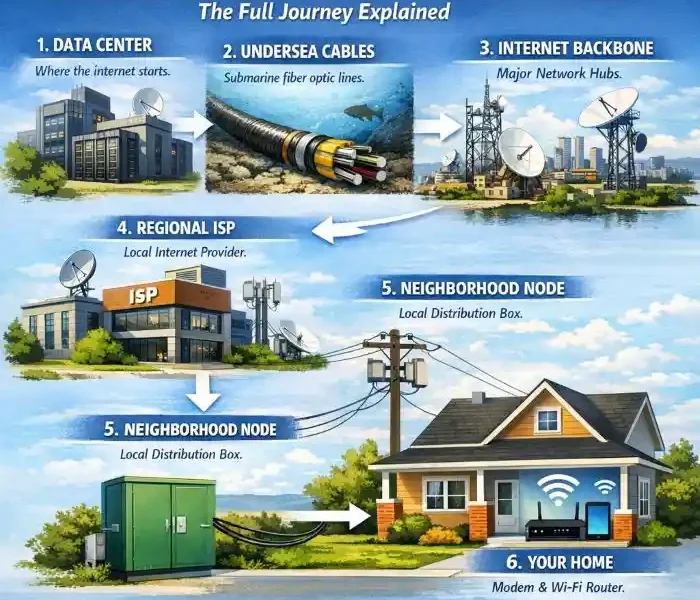
<p>It starts on the global internet backbone, often crossing oceans through undersea fiber cables. It enters Pakistan through national infrastructure and exchange points. Your ISP carries it into your neighborhood. From there, the last-mile line brings it from the street into your home. Then your modem or ONT receives the signal, your router distributes it, and Wi-Fi or Ethernet delivers it to your devices.</p>
<p>That is the full journey.</p>
<p>Once you understand this path, you can make smarter choices about providers, packages, routers, wiring, and upgrades. You can also spot where problems happen instead of blaming everything on “slow internet.”</p>
<p>If you want better performance in 2026, start by checking your connection type, your router placement, and your in-home setup. <strong>The internet may already be reaching your house well — you just need to make sure it reaches every room just as well too.</strong></p>
<p><a href="https://comeawayhome.co.uk/">House</a></p>
Ever wonder what really happens when you tap play on a movie, open YouTube, or join a video call? It feels instant. You click, and the internet responds. But behind that simple moment is a long chain of systems working together in seconds.
If you have ever asked, “how does internet get to your house?”, you are asking a smart question. The answer is not just “through Wi-Fi” or “through a wire.” The internet reaches your home through a step-by-step process that starts far away, often in another country, and ends at the phone, TV, laptop, or security camera in your house.
In 2026, more than 5.3 billion people use the internet worldwide. In cities like Lahore, home internet has become a basic need for work, study, entertainment, shopping, and smart home devices. At the same time, many people still do not fully understand how internet reaches your home, why one connection is faster than another, or why the speed in one room feels great while another room feels dead.
This guide breaks it all down in simple language.
You will learn how data travels through the global backbone, how your internet service provider brings that connection into your area, how the line enters your home, what your modem and router really do, and how Wi-Fi finally reaches your devices.
By the end, you will not just know how internet gets to your house. You will also understand how to choose the right connection, spot weak points, and improve your setup without wasting money.
The Global Internet Backbone: Where It All Begins

How Data Travels from Servers to Your Country
The internet is not one single thing. It is a massive network of networks connected across the world.
When you open a website or stream a video, the data usually starts in a server. A server is simply a powerful computer that stores websites, apps, videos, files, or online services. That server might be in Pakistan, Dubai, Europe, Singapore, or the United States.
So how does that data get here?
Most of the world’s internet traffic travels through undersea fiber optic cables. These are long cables placed on the ocean floor. They carry data as light signals, and they move huge amounts of information very quickly. In fact, around 99% of international internet traffic depends on these cables, not satellites.
Pakistan connects to the wider world through these international systems. A good example is the AAE-1 cable, which links Asia, the Middle East, and Europe and has a landing point in Karachi. That means a request from a home in Lahore may travel through Pakistan’s national network to Karachi, then out to international cable systems, then to a foreign server, and back again in seconds.
That sounds like a long trip, but the process is extremely fast.
To make this work, data does not travel as one giant block. It gets broken into tiny pieces called packets. Each packet contains part of the information along with destination details. Network equipment reads those details and forwards the packets along the best possible path.
You can think of it like sending many small courier parcels instead of one huge box. Each parcel can move efficiently through the system, and the receiving device puts everything back together.
Satellites also play a role, but mostly in places where wired infrastructure is difficult or expensive. Services like Starlink use low-Earth orbit satellites to provide internet in remote areas. That can be useful in rural Pakistan or places with weak cable and fiber coverage. Still, in cities, fiber and cable usually offer better stability and lower delay.
Pakistan’s Internet Infrastructure Overview
Once international data reaches Pakistan, it does not go directly to your home. It first moves through national infrastructure.
Pakistan relies on a mix of:
- International gateways
- Internet exchange points (IXPs)
- National fiber routes
- Internet service providers
- Local distribution systems
Internet exchange points help networks share traffic more efficiently inside the country. Instead of sending local traffic far away and back, IXPs allow Pakistani networks to exchange data more directly. This improves speed and reduces unnecessary load.
Large cities like Karachi and Lahore play an important role because they are major telecom and traffic centers. Lahore, in particular, has grown into a key urban market for home fiber, business internet, and mobile broadband.
Government bodies and regulators also shape the system. The Pakistan Telecommunication Authority (PTA) oversees telecom regulation, while national backbone and access infrastructure depend on both public and private sector investment.
Here is a simple example.
Imagine you are in Lahore watching a YouTube video hosted on a server outside Pakistan. Your request leaves your home, goes to your ISP, moves through Pakistan’s backbone, reaches an international gateway, crosses international links, reaches the content server, and then returns through the same wider system. If the video platform has caching or local delivery systems closer to Pakistan, the process becomes even faster.
So before the internet reaches your home, it has already traveled through a huge digital highway system.
Your ISP Delivers Internet to the Neighborhood
What ISPs Do in the Process
Your ISP, or internet service provider, is the company that connects your home to the internet.
In Lahore and other Pakistani cities, this may include providers such as PTCL, Nayatel, StormFiber, Transworld, or wireless operators offering fixed internet services.
An ISP does much more than send you a monthly bill.
It buys or manages bandwidth, runs network equipment, maintains fiber routes, installs neighborhood infrastructure, handles customer accounts, assigns IP addresses, and supports homes and businesses. In simple words, your ISP acts like the bridge between the global internet and your house.
When you subscribe to a package, you are paying for access to your ISP’s network. That network already connects upstream to larger national and global internet systems.
But the most important part for your daily experience is the last-mile network. This is the final part of the connection that brings the internet from the provider’s local system into your area and then into your home.
Common Delivery Methods to Your Area
Different providers use different technologies to reach neighborhoods. Some use fiber optic lines. Others use cable, old telephone lines, or wireless towers.
Here is a simple comparison:
| Connection Type |
Speed Potential |
How It Reaches Neighborhood |
Availability in Lahore |
| Fiber Optic |
Up to 10 Gbps |
Buried fiber cables or overhead optical lines |
High in many urban areas |
| Cable |
Up to 1 Gbps |
Coaxial lines from street cabinets or boxes |
Widespread in many zones |
| DSL |
Up to 100 Mbps |
Existing telephone copper lines |
Common in older areas |
| 5G Fixed Wireless |
Up to 500 Mbps |
Mobile towers and wireless receivers |
Growing in urban pockets |
Fiber is the most modern and future-ready option. It carries data using light, which allows high speed and strong reliability. In many parts of Lahore, especially newer housing developments and premium residential areas, fiber rollout has expanded quickly.
Cable internet uses coaxial cable, the same basic type once used mainly for TV signals. It can still deliver strong speeds, especially where providers have upgraded their networks.
DSL uses traditional copper telephone lines. It helped millions of homes get online for years, but it has limits. The farther your home is from the provider’s equipment, the weaker the speed often becomes.
Fixed wireless uses a nearby tower instead of a direct cable line to your home. This can be helpful where laying fiber is difficult, but performance depends on coverage, weather, congestion, and signal quality.
Neighborhood Nodes and Street Cabinets
Before the internet gets to your house, it usually reaches a local hub in your area.
This hub may be a:
- Fiber distribution box
- Street cabinet
- Pole-mounted splitter
- Neighborhood node
- Small provider hut or enclosure
You can think of it as a mini distribution center. The ISP sends internet into that point, and from there the connection branches out to nearby homes.
In a fiber network, one main line may enter a local cabinet and then split into lines serving different streets or buildings. In a cable network, a node may feed multiple homes through coaxial branches. In DSL, the telephone network carries the signal through the copper system already installed in the area.
This is why your neighborhood matters. Two houses in the same city can get very different service if one sits in a fiber-covered block and the other still depends on old copper lines.
Fiber vs. DSL in Real-World Lahore Use
Let’s make this practical.
If you live in a newer part of DHA Lahore, Bahria Town, or another developed urban zone, you may have access to fiber-to-the-home service. That usually means faster downloads, better uploads, smoother streaming, and fewer issues when many devices are online at once.
If you live in an older neighborhood with legacy phone infrastructure, you may still rely on DSL. That can work well for light use, but you may feel the difference during HD streaming, online gaming, cloud backups, or multiple video calls.
So when people ask how internet reaches your home, the first local answer is this: your ISP brings the signal into your neighborhood through a local delivery system, and the type of that system affects your speed, price, and reliability.
How Internet Enters Your House from the Street
The “Last Mile” Connection Explained
Now let’s answer the most direct version of the question: how does internet get to your house from the street?
This final stage is called the last mile.
The last mile is the physical path between your provider’s nearby infrastructure and your home. Even though it may only cover a short distance, it has a huge impact on your connection quality.
Depending on the technology, the line may reach your house through:
- An underground conduit
- A pole from above
- A wall-mounted entry point
- A shared building wiring system
- A wireless receiver fixed to your roof or wall
In a fiber setup, a thin fiber cable often comes from a local splitter or distribution box and runs to your house. In a cable setup, coaxial cable enters from a street line or box. In DSL, the connection may use the same copper pair that supports the phone line. In fixed wireless, a receiver or antenna communicates with a nearby tower.
The signal has now reached your property, but it still needs to enter your home correctly.
Physical Entry Points into the House
Most internet connections enter through a specific access point.
This can be:
- A small hole in an outer wall
- A utility pipe or conduit
- A wall jack inside a room
- A building riser in apartments
- A terminal box on an exterior wall
From there, the cable connects to equipment inside the house. If the provider handles the installation well, this entry point stays neat, weather-protected, and secure.
Many connection issues start at this point. A poorly fixed cable, a loose connector, water exposure, sharp bending, or physical damage can reduce performance or cause full outages.
That is why professional installation matters more than many people realize.
Wiring Inside Your Home
Once the internet line enters your home, the next question is how it moves from that point to the room or devices you use every day.
Some homes have a very clean setup. The line enters near the main living area, the modem and router sit in a central location, and Wi-Fi reaches most of the house easily.
Other homes are more difficult. Thick walls, multiple floors, long hallways, or poor cable placement can create weak zones.
You generally have three main ways to distribute internet inside the house:
Ethernet
Ethernet is the most reliable option. It uses network cable, usually Cat5e, Cat6, or better, to carry internet directly from the router to a device or another access point.
If you want stable performance for gaming, smart TVs, desktop PCs, office workstations, or mesh backhaul, Ethernet is hard to beat.
Wi-Fi
Wi-Fi is the easiest and most flexible option. It sends internet wirelessly to phones, laptops, tablets, cameras, and smart home devices. It is convenient, but walls, distance, and interference can reduce speed.
Powerline Adapters
Powerline adapters use your home’s electrical wiring to carry network signals between rooms. They can help when running Ethernet is difficult, but performance depends on the condition of your home’s electrical system.
A Smart Home Improvement Tip
If you are renovating, building, or upgrading your house, this is one of the best times to plan your internet wiring.
Ask yourself:
- Do you have dead zones upstairs?
- Do you work from home?
- Do you stream 4K video?
- Do you have CCTV, smart lights, or smart appliances?
- Do multiple family members use the internet at the same time?
If the answer is yes, consider running Ethernet cables to key rooms. Even one or two wired points can improve your whole home network.
A modern internet package cannot perform at its best if your internal wiring is outdated or poorly placed.
Common Home Setup Challenges in Pakistan
In Pakistan, home internet setups often face some very practical problems.
Power outages can interrupt the modem, router, or neighborhood equipment. If your home devices lose power, your internet goes down even if the outside line is fine.
Monsoon weather can damage exposed cables, especially older copper and poorly protected outdoor lines.
Voltage fluctuation can affect equipment life, especially cheap routers and power adapters.
Concrete walls and large houses can weaken indoor Wi-Fi signals.
Shared building wiring in apartments can also create quality differences between units.
Here are a few simple ways to reduce problems:
- Use a surge protector
- Keep your router and ONT in a cool, ventilated place
- Avoid sharp bends in visible cables
- Ask for buried or better-protected fiber where possible
- Use a UPS if power cuts are common
- Place the router away from metal objects and thick obstructions
If you understand the last mile and your in-home setup, you are already ahead of most users.
From Modem to Router – The Core of Your Home Network
Modem: The Gateway Device
Once the line enters your home, it connects to a device that communicates with your ISP. This is usually a modem or, in fiber setups, an ONT.
A modem’s job is to translate the signal from the provider into a form your home network can use.
Different internet types use different gateway devices:
- DSL modem for phone-line internet
- Cable modem for coaxial internet
- ONT for fiber internet
An ONT, or optical network terminal, is the fiber version of a modem. It converts the light signals coming through the fiber into usable internet data for your router or combined home gateway.
Some providers give you a separate ONT and router. Others provide one combined device that handles both jobs.
If this device stops working, your whole internet connection stops. That is why the first troubleshooting step is often to check its power and status lights.
Router: Distributing Internet to Devices
If the modem or ONT is the gateway, the router is the traffic manager inside your home.
The router takes the internet connection and distributes it to your devices through Wi-Fi and, in many cases, Ethernet ports.
It also manages things like:
- Device connections
- Local IP addresses
- Basic security
- Traffic handling
- Parental controls
- Guest networks
In 2026, many new routers support Wi-Fi 6 or Wi-Fi 6E, and higher-end models continue to improve speed, coverage, and handling for many devices at once.
This matters because the modern home no longer has just one laptop and one phone. A typical family may have:
- Several smartphones
- Smart TVs
- Laptops
- Gaming consoles
- CCTV cameras
- Smart speakers
- Tablets
- Printers
- Smart bulbs
- Video doorbells
A weak router in a busy house creates congestion quickly.
Mesh vs. Single Router: Which for Your House?
Not every home needs a complex setup. But many homes do need more than one Wi-Fi point.
If you live in a small apartment, a good single router may be enough.
If you live in a large, multi-floor home, especially one with thick walls, a mesh Wi-Fi system can make a big difference.
Here is a simple breakdown:
Mesh system
- Covers dead zones better
- Works well in multi-story homes
- Great for larger houses and villas
- Lets you move around without losing signal badly
- Costs more than a basic router
Single router
- Cheaper and simpler
- Good for apartments and smaller homes
- Easier to manage
- May struggle in distant rooms
- Can create weak zones behind thick walls
For many larger Lahore homes, especially around 3000 square feet or more, mesh can be the smarter choice if you want reliable coverage in bedrooms, lounges, and outdoor spaces.
Why Router Placement Matters
Even a strong router performs poorly in the wrong spot.
Avoid placing it:
- Inside a cabinet
- On the floor
- Behind a TV
- Near a microwave
- In a corner of the house
- Next to thick concrete or metal surfaces
Instead, place it in a central, elevated location if possible.
A router cannot magically push through every wall. Good placement often improves performance more than people expect.
Wi-Fi and Devices – How Internet Reaches Your Gadgets
Wireless Distribution in Your Home
Now we are at the final step.
Your modem or ONT connects to your router, and your router sends the internet to your devices through Wi-Fi or Ethernet. This is how the internet reaches your phone, laptop, tablet, smart TV, or camera.
Wi-Fi usually operates on two common frequency bands:
2.4 GHz
This band travels farther and passes through obstacles more easily. But it is often slower and more crowded.
5 GHz
This band is faster and better for streaming, gaming, and high-speed tasks. But it does not travel as far and weakens more quickly through walls.
In newer setups, you may also see 6 GHz support with Wi-Fi 6E, which offers more clean wireless space, but device compatibility still matters.
Why Walls and Layout Affect Speed
A big reason people ask, “why is my internet fast in one room and weak in another?”, is simple: Wi-Fi signals lose strength as they travel.
In many Lahore homes, thick concrete walls, tiled structures, and multi-floor layouts reduce signal quality. Large furniture, mirrors, metal frames, and appliances can also affect performance.
So if your package says 100 Mbps, that does not mean every room will always receive exactly 100 Mbps over Wi-Fi.
Your plan speed is one thing. The speed that actually reaches your device depends on placement, interference, wall material, device quality, and network load.
Smart Home Devices and Bandwidth Use
Today’s home internet does more than support browsing.
Many houses now use:
- Smart lights
- Security cameras
- Video doorbells
- Smart TVs
- Voice assistants
- Streaming boxes
- Cloud backups
- Gaming systems
Each device pulls some bandwidth. Some use very little, like a smart bulb. Others use a lot, like a 4K streaming TV or cloud camera system.
If your network starts feeling slow, the issue may not be your package alone. It may be that too many devices are using the connection at the same time.
A good router with QoS, or quality of service, can help. QoS lets you prioritize important traffic, such as video calls, streaming, or gaming, over less urgent background activity.
Speed Testing: Measuring What Reaches Your Devices
If you want to know how well your internet really performs, run a speed test.
Test in two ways:
- Directly by Ethernet, if possible
- Over Wi-Fi in different rooms
This tells you whether the issue is the ISP line or your internal wireless setup.
In well-served parts of Lahore, a good fiber connection can commonly deliver around 100 to 200 Mbps or more depending on the package. But again, the room where you test matters.
If your wired speed is strong but Wi-Fi speed is poor, the internet is reaching your house just fine. The weak point is likely your home network.
Types of Home Internet: Comparing Fiber, Cable, DSL, and More
Detailed Breakdown of Major Connection Types
Not all home internet works the same way. The way internet gets to your house depends heavily on the connection type.
Fiber Internet
Fiber is the fastest and most modern option for most homes.
It sends data as pulses of light through fiber optic strands. This allows very high speeds, better upload performance, and lower delay. Fiber is excellent for remote work, 4K streaming, gaming, CCTV systems, and homes with many connected devices.
It is often the best answer when someone asks how internet gets to your house in the most advanced way.
Cable Internet
Cable internet uses coaxial cable. It can offer good speeds and works well in many urban areas. It is often widely available where cable TV systems already exist.
However, depending on the provider’s network design, performance may vary during peak hours.
DSL Internet
DSL travels over old copper telephone lines. It was once a major step forward, but today it is more of a legacy solution.
It can still be useful for basic browsing, email, light streaming, and small households. But it usually cannot match fiber’s speed or stability.
Fixed Wireless and Satellite
Wireless home internet connects your property through nearby towers or satellite systems.
This is useful in places where cables are limited. It can be a good option for outskirts, rural homes, temporary setups, or locations where fiber installation is not yet available.
Comparison Table for 2026 Home Use in Pakistan
| Internet Type |
Typical Speed Range |
Approx. Monthly Cost (PKR) |
Reliability |
Best For |
| Fiber |
50 Mbps to 1 Gbps+ |
3,000 to 12,000+ |
Excellent |
Families, streamers, remote work, gaming |
| Cable |
25 Mbps to 500 Mbps |
2,500 to 8,000 |
Good |
General home use, HD streaming |
| DSL |
10 Mbps to 100 Mbps |
2,000 to 6,000 |
Fair to good |
Light use, older neighborhoods |
| 5G Fixed Wireless |
20 Mbps to 500 Mbps |
3,000 to 10,000 |
Varies by signal |
Flexible setups, no fiber areas |
| Satellite |
25 Mbps to 250 Mbps |
12,000+ |
Useful but weather-sensitive |
Remote and rural locations |
These are broad ranges, not fixed prices. Actual packages vary by city, provider, and installation costs.
What About the Future?
Looking ahead, fiber will continue to lead home broadband. Wireless systems will improve too, especially as 5G expands and future technologies move toward the next generation.
You may hear people mention 6G as a future concept for the 2030 period. That is more about upcoming wireless development than a current home replacement in most areas. For now, fiber remains the strongest long-term option for many households.
Troubleshooting: Why Internet Might Not Reach Your House Properly
Common Causes of Poor Home Internet
Sometimes the internet does reach your house, but not properly.
The problem may come from outside, inside, or both.
Common causes include:
- Faulty or damaged wiring
- Loose cable connections
- ISP outage in the area
- Router overheating
- Weak Wi-Fi coverage
- Too many connected devices
- Interference from other electronics
- Power issues affecting your modem or ONT
A broken outside line after bad weather can cut service completely. A weak router in a far corner of the home can make it feel like the internet is broken even when the main line is fine.
Quick Fixes You Can Try First
Before you call your provider, try these steps:
- Restart the modem, ONT, and router
- Check whether all power lights are normal
- Make sure cables are firmly connected
- Test one device close to the router
- Run a wired speed test if possible
- See whether the issue affects all devices or only one
- Move the router to a better spot if signal is weak
If none of that works, then it makes sense to contact your ISP, such as PTCL, Nayatel, StormFiber, or your local provider. If the fault is outside your home, only they can repair it.
Upgrading Your Home for Faster Internet in 2026
Smart Ways to Improve Your Setup
If you want better internet, do not focus only on buying a bigger package.
First, check whether your house is ready for it.
In Lahore, fiber installation for a new or upgraded setup may cost roughly PKR 5,000 to PKR 20,000, depending on the area, provider, and building conditions. In some cases, promotional offers reduce the upfront cost.
Here are a few useful upgrade ideas:
- Move from DSL to fiber if available
- Add Ethernet wiring for key rooms
- Replace an old router with Wi-Fi 6 or newer
- Use a mesh system in large homes
- Protect equipment with surge protection or backup power
A faster package only helps if your modem, router, and home layout can actually support it.
FAQs
How does internet get to your house without cables?
It can reach your house through fixed wireless or satellite internet. In fixed wireless, a nearby tower sends the connection to a receiver at your property. In satellite internet, signals travel between your dish and satellites in space. These options are useful where fiber or cable is not available.
How long does fiber take to reach a new house in Lahore?
It depends on the provider and whether fiber already exists in your street. If the area is already covered, installation may take a few days. If the provider needs to extend infrastructure, it can take much longer.
What is the average speed in Pakistan homes?
It varies widely by area and provider. Many homes still use lower-speed packages, but in well-served city zones, especially with fiber, speeds of 50 Mbps to 200 Mbps or more are becoming common.
What is the difference between a modem and a router?
A modem or ONT connects your home to the ISP. A router shares that connection with your devices through Wi-Fi or Ethernet. Some providers give you a single device that does both jobs.
Why is my internet slow even with a fast package?
Your issue may be Wi-Fi coverage, not the internet line itself. Thick walls, poor router placement, old devices, interference, or too many active users can all slow down the speed that reaches your devices.
Is fiber better than DSL for home use?
Yes, in most cases. Fiber is usually faster, more stable, and better for modern homes with multiple users, streaming, gaming, and smart devices.
Can power outages affect internet service inside my house?
Yes. Even if the outside network is working, your modem, ONT, and router need electricity. Without backup power, your internet inside the house may stop during outages.
Conclusion
So, how does internet get to your house?
It starts on the global internet backbone, often crossing oceans through undersea fiber cables. It enters Pakistan through national infrastructure and exchange points. Your ISP carries it into your neighborhood. From there, the last-mile line brings it from the street into your home. Then your modem or ONT receives the signal, your router distributes it, and Wi-Fi or Ethernet delivers it to your devices.
That is the full journey.
Once you understand this path, you can make smarter choices about providers, packages, routers, wiring, and upgrades. You can also spot where problems happen instead of blaming everything on “slow internet.”
If you want better performance in 2026, start by checking your connection type, your router placement, and your in-home setup. The internet may already be reaching your house well — you just need to make sure it reaches every room just as well too.
House